RetroLine sits between your telephone and your cell/mobile phone. The telephone thinks it is connected to a phone line; your mobile thinks it is connected to a Bluetooth headset. RetroLine translates between the two.
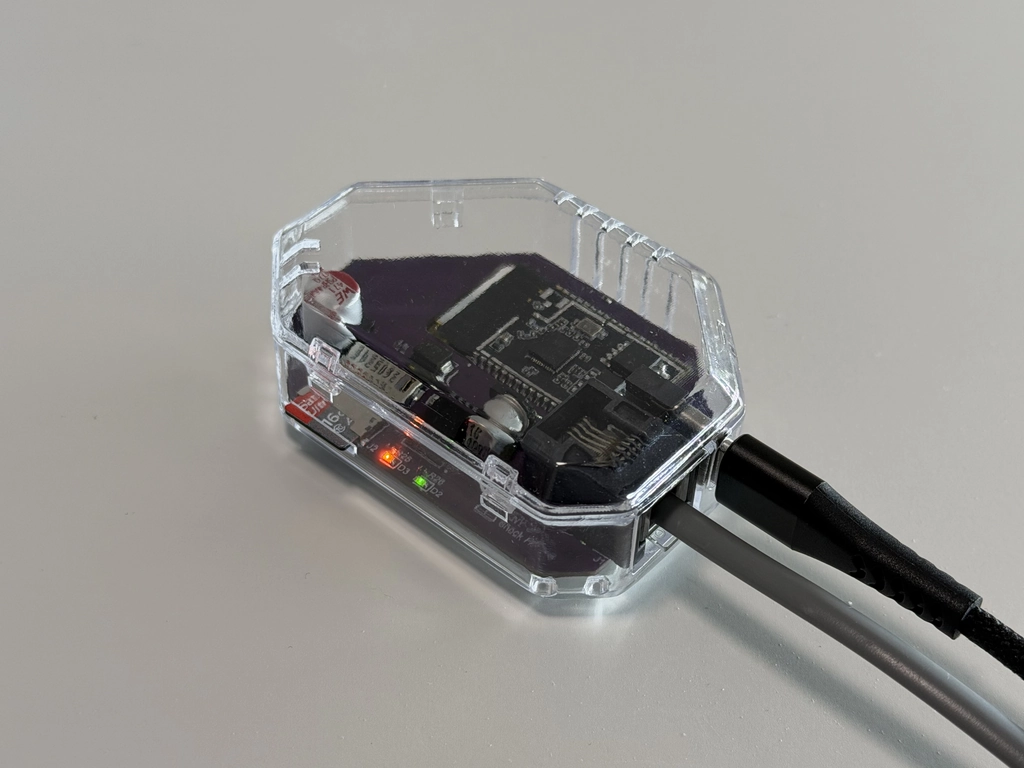
This is a working RetroLine prototype, shown in a clear case so you can see the circuit board inside. It is the unit we use for demonstrations and for our own everyday testing.
It is very close to the final release version. The prototype already makes and takes calls exactly as described on this page, and the remaining work is refinement rather than redesign.
Small details may still change before production, so the unit you receive may look slightly different from the one pictured here.
Connect the phone's line lead to RetroLine's RJ-11 socket. If your phone has a 600 series connector, use an adaptor to convert it.
Connect a USB-C power supply that can deliver at least 1 Amp. RetroLine boots up in a few seconds and the telephone gets a dial tone.
Open Bluetooth settings on your smartphone and pair it with RetroLine, like you would with a car or a headset.
Join RetroLine's own WiFi access point or configure your home WiFi, then open http://retroline.local in a browser.
Choose your country so that the tones, ring cadence and Caller‑ID format match your phone.
There is also an app for iOS and Android available should you not wish to use the browser based dashboard.
Lift the landline handset, wait for a dial tone and dial the number you wish to call. The number is passed to your mobile, which places the call.
When your cell/mobile phone rings, the landline telephone rings with it (and will show the caller on any Caller‑ID displays should the landline have one). Lift the handset to answer.
Replace the handset. Hanging up always ends the call, exactly like a landline does.
Dial your chosen sequence (the default is #) and your smartphone assistant answers through the handset instead of placing a call.
Dial your programmed sequences to put the caller on hold with music, bring them back, or play a sound-board clip. Recording can run automatically on every call.
Check the handset is properly on its cradle, that Bluetooth shows connected on your mobile, and that you're using a line lead rather than clip leads and your phone pins/wiring is using line/pair 1. If you need more help, please see our FAQ.
Want to see all the features RetroLine has to offer? Have a look at the full feature list.
See all features